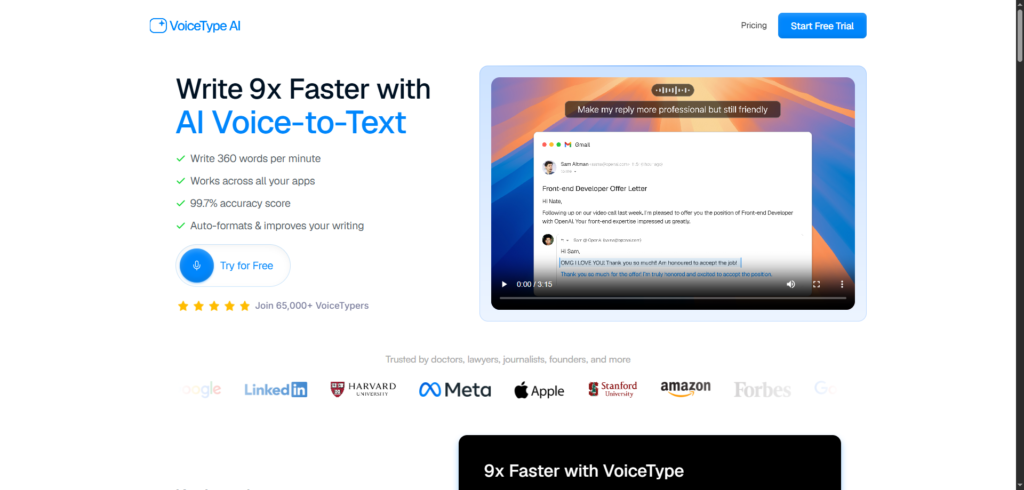
VoiceType Review 2026: The AI Voice-to-Text Tool That Helps You Write Faster and Work Smarter
Typing is still one of the biggest productivity bottlenecks for professionals, creators, students, and business owners.
Whether you’re writing emails, creating content, documenting meetings, responding to messages, or drafting reports, the keyboard often slows down the flow of ideas. Many people can speak significantly faster than they can type, yet traditional dictation tools have historically struggled with accuracy, formatting, and usability.
The result is a frustrating experience filled with corrections, editing, and repeated commands.
Modern AI-powered voice typing tools are changing that.
Instead of simply converting speech into text, today’s solutions can understand context, improve formatting, correct mistakes, and adapt output for different situations.
VoiceType is one of the platforms leading this shift.
Built as an AI-powered voice-to-text assistant, the platform helps users write using speech across multiple applications while automatically handling formatting, punctuation, and text refinement. Rather than acting as a basic dictation tool, it aims to function as a complete voice-driven writing assistant.
In this VoiceType review, we’ll explore how the platform works, its features, pricing, benefits, and whether it is worth using in 2026.
Why Voice Typing Is Becoming More Popular
The amount of digital communication people manage every day continues to grow.
Professionals routinely spend hours writing:
- Emails
- Reports
- Meeting notes
- Documentation
- Project updates
- Social media content
- Client communications
- Research notes
Typing remains effective, but it can be slow.
Studies and productivity reports consistently show that most people speak much faster than they type. This gap creates an opportunity for voice-first workflows that allow users to capture ideas immediately without interrupting their thought process.
As AI transcription technology improves, voice typing is becoming a practical alternative for many daily tasks.
What Is Voice Type?
VoiceType is an AI-powered voice-to-text platform designed to convert speech into polished written content.
The software works across desktop applications, allowing users to dictate text wherever they would normally type.
Its capabilities include:
- Voice-to-text transcription
- AI formatting
- Automatic punctuation
- Writing refinement
- Tone adaptation
- Multi-language support
- Cross-application compatibility
- Context-aware transcription
Rather than producing raw transcripts, the platform attempts to generate clean, usable text that requires less editing after dictation.
The platform is designed for:
- Writers
- Content creators
- Business professionals
- Students
- Marketers
- Consultants
- Entrepreneurs
- Remote workers
Its main goal is to help users communicate faster without sacrificing quality.
How VoiceType Works
One of the platform’s strengths is its simplicity.
Step 1: Install the application.
Users install VoiceType on their computer and connect it to their workflow.
The software operates across supported applications, allowing dictation within existing tools.
Step 2: Start Speaking
Instead of typing, users simply speak naturally.
The AI converts speech into text in real time.
Step 3: Automatic Formatting
The platform automatically adds the following:
- Punctuation
- Capitalisation
- Sentence structure
- Formatting improvements
This reduces the amount of manual editing required after dictation.
Step 4: Review and Send
Users can review the generated text and make minor adjustments if necessary before publishing, sending, or saving their work.
VoiceType Review: Key Features
1. AI Voice-to-Text Transcription
The platform’s primary feature is AI-powered transcription.
VoiceType claims accuracy rates of up to 99.7% while allowing users to dictate significantly faster than traditional typing methods.
For users who spend much of their day writing, this can provide meaningful productivity gains.
2. Cross-App Functionality
Unlike some voice tools that work only within specific platforms, VoiceType is designed to function across many desktop applications.
Users can dictate inside:
- Email platforms
- Documentation tools
- Project management software
- Messaging applications
- Note-taking software
This flexibility helps integrate voice workflows into existing processes.
3. Automatic Formatting
Traditional speech recognition often produces blocks of text that require extensive editing.
VoiceType automatically handles:
- Punctuation
- Capital letters
- Paragraph structure
- Formatting improvements
This makes dictated text easier to use immediately.
4. Tone Matching
One of the more distinctive features is tone adaptation.
The platform can adjust writing style based on context, helping users create content that feels appropriate for different situations.
Examples include:
- Professional emails
- Internal messages
- Notes
- Formal communication
This reduces the amount of rewriting often required after dictation.
5. Context Awareness
VoiceType uses contextual understanding to improve transcription quality.
Instead of treating every spoken phrase in isolation, the software attempts to interpret content based on the surrounding context, helping reduce errors and improve clarity.
6. Multi-Language Support
The platform supports more than 35 languages, making it useful for international teams and multilingual users.
This broad language coverage increases accessibility across different markets.
7. Whisper Mode
VoiceType includes a whisper mode designed for quieter environments.
Users can dictate softly while maintaining transcription accuracy, making the platform useful in shared workspaces and public settings.
8. AI Writing Assistance
The platform goes beyond basic dictation by helping refine written output.
Rather than simply converting speech to text, it acts as a writing assistant that improves readability and presentation.
Benefits of Using VoiceType
Write Faster
The most obvious benefit is speed.
Many users can speak considerably faster than they type, allowing them to capture ideas more efficiently.
Reduce Typing Fatigue
Professionals who spend hours at a keyboard often experience fatigue.
Voice workflows can reduce repetitive typing and improve comfort during long work sessions.
Improve Productivity
Faster content creation means users can complete more tasks within the same amount of time.
Capture Ideas Instantly
Speaking often feels more natural than typing.
VoiceType allows users to document thoughts immediately without interrupting creative flow.
Support Multiple Workflows
The platform works for:
- Content creation
- Email writing
- Documentation
- Meeting notes
- Brainstorming
- Planning
- Research
This versatility increases its value across different professional roles.
Who Should Use VoiceType?
Content Creators
Writers, bloggers, and marketers can accelerate content production using voice-first workflows.
Business Professionals
Professionals handling large volumes of communication can reduce writing time significantly.
Entrepreneurs
Founders often manage multiple responsibilities and may benefit from faster note-taking and communication.
Students
Students can use voice dictation for essays, notes, and research projects.
Consultants
Consultants producing reports, proposals, and documentation may find the platform particularly useful.
Remote Teams
Distributed teams can improve documentation and communication efficiency through voice-driven workflows.
VoiceType Pricing
According to the official pricing information, VoiceType offers several subscription options.
These include:
Free Trial
- Trial access
- Feature testing
- Platform evaluation
Monthly Plan
- Unlimited transcription access
- Full feature availability
- Ongoing updates
Annual Plan
- Reduced monthly cost
- Full functionality
Lifetime Access
- One-time payment option
- Permanent access to premium features
Pricing and promotional offers can change over time, so users should verify current details on the official website before purchasing.
Pros and Cons
Pros
- High transcription accuracy
- Cross-application support
- Automatic formatting
- Multi-language support
- Tone adaptation
- Whisper Mode
- AI writing assistance
- Free trial available
Cons
- Premium features require a paid plan
- Voice recognition quality can vary by environment
- Some users may need time to adapt to voice-first workflows
- Editing may still be required for specialised terminology
How VoiceType Compares to Traditional Dictation Tools
Older dictation software focused almost entirely on speech recognition.
Users often needed to manually do the following:
- Add punctuation
- Correct formatting
- Fix grammar
- Edit structure
VoiceType takes a broader approach.
The platform combines transcription with AI-powered writing assistance, reducing the amount of work required after dictation. Instead of generating raw text, it aims to produce content that is ready for immediate use.
This makes it more suitable for modern productivity workflows.
Final Thoughts
Voice technology has evolved significantly over the past few years.
What was once a niche productivity tool is becoming a practical alternative to traditional typing for many professionals. Improved AI models have made voice-to-text systems faster, more accurate, and easier to use.
VoiceType reflects this shift by combining transcription, formatting, writing assistance, and contextual understanding within a single platform. Its ability to work across applications, support multiple languages, and adapt content for different situations makes it a strong option for users who spend significant time writing.
For professionals, creators, students, and business owners looking to reduce typing and accelerate communication, VoiceType is a platform worth considering in 2026.
Frequently Asked Questions (FAQ)
What is Voice Type?
VoiceType is an AI-powered voice-to-text platform that converts speech into formatted written content across desktop applications.
How accurate is VoiceType?
The platform advertises transcription accuracy of up to 99.7% under supported conditions.
Does VoiceType support multiple languages?
Yes. VoiceType supports more than 35 languages for multilingual users.
Can VoiceType work with other applications?
Yes. The platform is designed to function across many desktop applications and workflows.
Does VoiceType offer a free trial?
Yes. Users can test the platform through a free trial before committing to a subscription.
Is VoiceType worth it?
For users who spend significant time writing emails, notes, reports, content, or documentation, VoiceType can help improve productivity by replacing much of the typing process with AI-powered voice dictation.